Local SEO
Why Your Business Isn't Showing on Google Maps (And How to Fix It)
Missing listing or weak local visibility? Diagnose the difference, check the evidence and choose the right next step.
In this guide 10 sections · open contents
- First, separate a listing problem from a ranking problem
- Check verification, eligibility and restrictions
- Understand relevance, distance and prominence
- Make the category and business details accurate
- Build useful reputation evidence, not review shortcuts
- Connect the profile to a useful, consistent website
- Avoid service-area and location-page shortcuts
- Google Maps Visibility Troubleshooting Checklist
- Measure discovery and enquiries separately
- What you can fix yourself, and when to get help
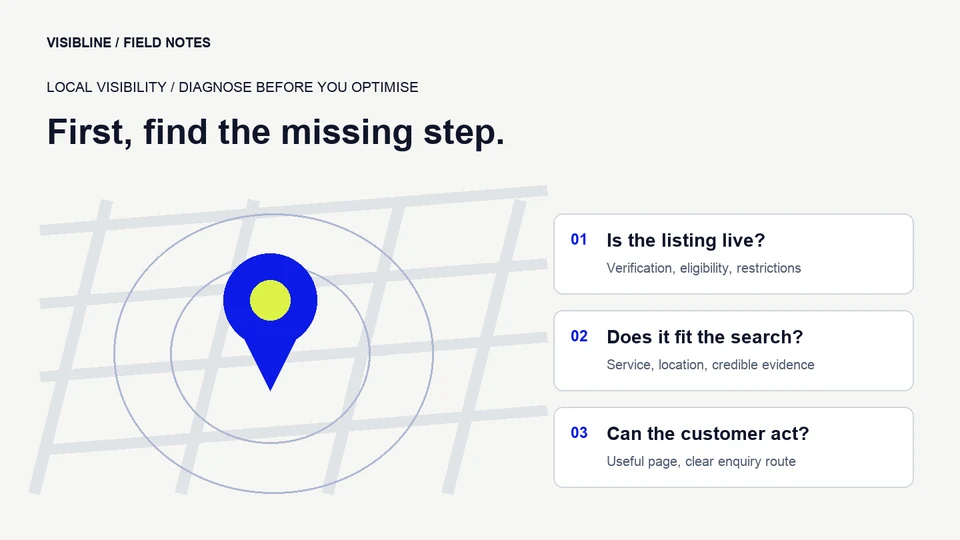
If your business is not showing on Google Maps, first establish whether the listing is missing or restricted, or whether it appears by name but performs poorly for a service search. These are different problems. Verification and policy issues need an account-level fix; a live profile needs a closer look at relevance, location, reputation and the route from discovery to enquiry.
Try searching for your exact business name and town, then a service you genuinely deliver. Record the query, the search location and what appears. A plumber found by name but absent for “boiler repair near me” should not start by creating another listing. A clinic whose profile is suspended should not start by rewriting its homepage. Diagnose the failure before choosing the remedy.
First, separate a listing problem from a ranking problem
Open the Google account that manages the business and inspect the profile status. Look for verification requests, rejected edits, restrictions or duplicate records. Confirm that the profile belongs to the actual business rather than an old address or a similarly named company. Search results alone cannot tell you whether the account needs attention.
Next, check whether customers can open the profile through its direct Maps link. If that works but a general service query does not show it prominently, the issue may be competitive visibility. Note whether the search is being made near the business or from another town. There is no single Maps position that every customer sees.
A useful working record has three columns: the exact symptom, the evidence supporting it, and the next check. “Not on Google” is too broad. “Profile opens by direct link, appears for the brand, but not in the first results for this service from this postcode” gives you something concrete to investigate.
Check verification, eligibility and restrictions
A Business Profile represents a real business that meets Google’s eligibility rules. Online-only operations are not made eligible by adding a postal address. A business that visits customers has a different address-display situation from a staffed premises customers can visit. Read the official representation guidelines before changing the setup.
Use the verification method offered in the account and supply the information requested through Google’s own process. Methods and evidence requirements vary, so an instruction from an old tutorial may not match your account. Keep access with the business owner, and invite an agency through appropriate management permissions rather than surrendering the account. Google explains the current process in its verification guidance.
If the profile is suspended or disabled, identify and correct the underlying policy issue before appealing. Assemble documents that accurately support the business identity and location. Google’s suspension guidance describes the appeal process and warns against creating another profile for the same business while an appeal is under review. An agency can organise a careful submission; it cannot promise reinstatement.
Understand relevance, distance and prominence
For eligible, live listings, Google identifies relevance, distance and prominence as the main local ranking considerations. Relevance concerns the match to the search, distance concerns proximity to the searcher, and prominence concerns how well known the business is. Its local ranking guidance also makes clear that businesses cannot pay Google for a better organic local ranking.
Use those principles to form a diagnosis rather than chase a supposed formula. If your main service is difficult to identify, examine relevance. If results change when you search from a different area, consider distance. If competitors have stronger independent evidence and established reputations, examine the credibility of your own presence. None of these observations reveals Google’s private weighting.
Distance also sets expectations. A practice in one neighbourhood should not assume it will lead every search across a large city. Decide which catchment is commercially useful before judging performance. A smaller area generating suitable appointments can matter more than an impressive-looking position somewhere your team cannot serve.
Make the category and business details accurate
Choose a primary category that describes the core business, not the broadest label or the most attractive keyword. Add relevant additional categories only when they describe what the business actually does. A roofing contractor and a general building firm may need different choices. Check the categories available in your own account instead of copying a competitor without context.
Review the name, phone, website destination, address or service-area setup, ordinary hours and special opening hours. Useful information helps a customer decide whether to contact you. Service descriptions should distinguish the work you accept: an installation specialist may not provide emergency repairs, and a dental practice may not offer every treatment someone searches for.
Use the real business name. Do not add a list of towns or services merely to target searches. Maintain a short change log when correcting information, particularly where several people or suppliers manage the profile. That makes it easier to understand an unexpected edit or a new verification request later.
Build useful reputation evidence, not review shortcuts
Ask customers for honest feedback through a consistent, appropriate process. Avoid buying reviews, offering rewards for positive ratings, or selectively steering only satisfied customers towards Google. The official review guidance explains how to request reviews without incentives. A repeatable request process is more useful than a one-off burst followed by months of silence.
Respond thoughtfully without publishing private customer information. A clinic can acknowledge feedback without confirming treatment details; a trades business can explain how someone may contact the team about a concern. Responses should help the reader understand the business, rather than repeat location keywords.
Add accurate services and original photographs that show the actual business, people or work where permission allows. Check whether someone arriving today would find the stated hours and access information correct. Treat those details as customer information, not a guaranteed ranking tactic. A complete-looking profile that sends customers to a disconnected phone number still fails commercially.
Connect the profile to a useful, consistent website
Follow the website link from the profile on a phone. Does it load a relevant page, explain the service, establish who provides it and offer a usable contact method? If a roofer’s link opens a vague homepage with no repair information, the problem extends beyond the profile. Clear service pages can support the decision after someone discovers you.
Check important pages for accidental indexing restrictions, broken links and information that only appears after a complicated interaction. Keep service descriptions specific and accurate. A useful page answers what you do, where you deliver it, what evidence a buyer can inspect and what happens after an enquiry. Visibline’s SEO service covers those broader website foundations.
Compare business information on the website and important third-party listings. Correct materially wrong names, contact details and addresses; do not assume every punctuation difference is a crisis. Start where customers actually discover or verify the business. Consistency is a practical accuracy task, not a reason to buy hundreds of low-quality directory entries.
Avoid service-area and location-page shortcuts
Set service areas to reflect where the team genuinely works. A service-area business should not display an address where customers cannot be received. Google’s service-area guidance explains the distinction between service-area and hybrid businesses. Changing a list of towns is not a promise of visibility throughout them.
Do not create profiles at borrowed addresses, virtual offices or unstaffed locations to manufacture coverage. Likewise, a location page should help someone assess real delivery in that market. Explain relevant services, practical coverage and the enquiry process; avoid pages that simply swap a city name into the same text.
For example, a plumbing firm may accept planned installations across a wider area than urgent callouts. Its website should make that distinction clear. A customer should not need to submit a form before discovering that the advertised service is unavailable at their address.
Google Maps Visibility Troubleshooting Checklist
Work through this checklist in order. Keep evidence beside each item rather than ticking it on assumption. It is a diagnostic framework, not a prediction of rankings.
- Identify the record. Confirm the correct business, management account and Maps link.
- Read the status. Check verification, restrictions, rejected edits and possible duplicates.
- Test two search types. Record exact-name discovery separately from service-query visibility.
- Record the location. Note the postcode or area used and repeat comparable checks.
- Check the primary category. Confirm that it reflects the main business activity.
- Validate essential details. Test the phone, website, hours and address or service-area information.
- Inspect customer evidence. Review honest feedback, responses and appropriate original photographs.
- Follow the website journey. Read the relevant service page and test its enquiry route.
- Check material inconsistencies. Correct important external records with wrong contact or location information.
- Choose the next action. Resolve eligibility issues first; then prioritise relevance, credibility and conversion work.
Measure discovery and enquiries separately
Use Business Profile performance to monitor available searches and interactions over comparable periods. Read the metric definitions: Google describes calls as clicks on the call button, not confirmation of an answered conversation or a sale. Its performance documentation explains what the reported actions represent.
Connect website visits with appropriate, consent-aware enquiry tracking. A useful record distinguishes a form submission, a suitable enquiry, an appointment and completed business. Ask the receiving team whether the requests match the service and coverage you intended. More interactions are not automatically better if most cannot be served.
Keep a dated log of profile and website changes, and note seasonal demand or operational changes alongside the reporting. Evaluate a pattern across consistent checks rather than treating one search from the owner’s phone as the verdict. Do not attribute every movement to the most recent edit.
What you can fix yourself, and when to get help
Owners can usually check account access, correct hours, test contact details, improve service information and establish a responsible review-request process. Those tasks depend on accurate business knowledge more than specialist tools. Start there before paying for an unspecified “Maps boost”.
Professional support becomes useful when restrictions are hard to interpret, several locations need consistent management, technical website issues block discovery, or enquiries arrive without clear attribution. Ask an agency for the diagnosis, the evidence, the proposed scope and the decisions you will need to approve. Be cautious of guaranteed placements or a plan built around extra profiles.
The right outcome is a profile that represents the real business and a website that helps suitable customers take the next step. For a practice, our dental marketing guide shows how treatment information and appointment enquiries fit into that wider journey.
Make your local visibility easier to diagnose.
Not sure why customers cannot find your business on Google Maps? Visibline can review your profile, local pages and enquiry route to help define a clear improvement plan.
Get Your Free Local SEO Audit